We’ve just finished running off a batch of posters for the upcoming Gospel in the Park 2024 event! It’s set to be a fantastic afternoon of music and community spirit, so make sure you get the date in your diary. 🎤✨
Supporting local events is what we do best—whether it’s through our community web pages or getting the word out with high-quality physical print.
Make Your Event Stand Out 📢📍
Are you organising a local concert, fundraiser, or community gathering? As your local print shop in Newtown, Powys, we specialise in fast, professional printing that gets noticed. From eye-catching posters to handy flyers and programmes, we help ensure your event is a success.
We aren’t just about pixels and paper; we are your local digital all-rounder, helping Newtown stay connected both online and off.
Need posters for your next event? ☎️ Call: 01686 610 106 📱 Text: 0783 222 7823 📍 Visit us: Frolic House, Newtown (Between the Medical Practice & Driving Test Centre)
It’s a bit of a Grumpy Old Man topic, but the “Subscription” based revenue stream explosion over the last few years, kinda grinds my gears. The best deals are pretty much always for new subscribers, leaving current customers of anti-virus subscriptions to pay full whack or more!
My latest grump is with AVG and their Anti-Virus Subscription
A good customer of mine has been with them for many years, and she is currently paying £160 for a two-year subscription. It’s bad enough that they prey on the nervous by bombarding them with pop-ups, employing scare tactics about “Hackers” and the like attacking them, so that they can upsell even more doubtful security “add-ons”. Shame on you, AVG. You used to be so good.
What I would advise is buying a non-subscription version from a friendly computer shop or Amazon. That way, you get the best price, and they don’t have your card details to “Auto-Renew”
My personal fav’s are:
1: Malwarebytes
2: Kaspersky
3: BitDefender
🛡️ Take Control of Your Security (and Your Wallet)
Don’t let “big tech” scare you into paying over the odds. If your anti-virus is constantly pestering you with pop-ups or your subscription feels like a ransom, it’s time for a change.
As your local computer shop in Newtown, we believe in honest security that protects your PC without draining your bank account. We can help you ditch the expensive “auto-renewals” and get you set up with a reliable, straightforward security solution that puts you back in the driving seat.
Pop in for a Security Health Check:
Fair Pricing: We’ll help you find the best protection without the hidden “loyalty tax.”
No Pressure: We give you the facts, not the scare tactics.
Local Support: If you have a question, you can talk to a real person, not a bot.
Visit us at Frolic House: ☎️ Call: 01686 610 106 📱 Text: 0783 222 7823 📍 Find us: Frolic House, Newtown (Between the Medical Practice & Driving Test Centre)
Whether you need a striking new hero image for your web design in Mid-Wales or a unique, eye-catching poster from our print shop in Newtown, Powys, we use the best tools in the trade, like AI, to bring your vision to life.
If you have a project that needs a bit of creative spark (and a lot of technical “know-how”), pop in and see what we can build for you.
Let’s get creative: ☎️ Call: 01686 610 106 📱 Text: 0783 222 7823 📍 Visit us: Frolic House, Newtown (Between the Medical Practice & Driving Test Centre)
We love a good clear-out at Frolic House, and we’d much rather see quality kit go to a good home than gather dust. If you’re a local group, student, or hobbyist who could use this Rexel Comb Binder, get in touch!
Perfect working order, with a box full of combs too!
While we’re making space, it’s a great reminder that we’ve got everything you need to keep your own documents looking professional.
Your Local Digital All-Rounder 📑🖨️
Even if you don’t snag the free binder, remember that we offer full document finishing and printing servicesright here in our Newtown print shop. Whether you need a business proposal bound, a thesis printed, or high-quality flyers for a local event, we’ve got the professional gear to get it done right.
From hardware repairs to physical print, we are your one-stop Newtown digital service hub.
Grab a bargain like this comb binder or start a project: ☎️ Call: 01686 610 106 📱 Text: 0783 222 7823 📍 Find us: Frolic House, Newtown (Between the Medical Practice & Driving Test Centre)
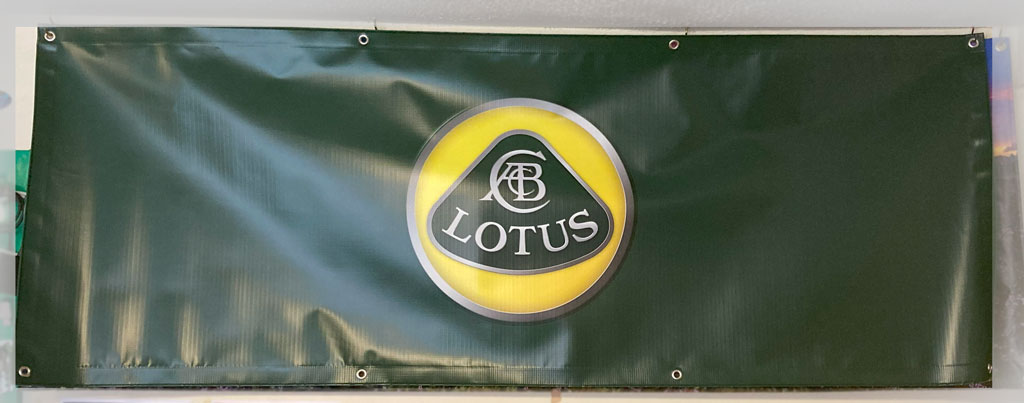
There’s nothing quite like the feeling of finally landing your “dream drive.” We recently had the pleasure of printing this bespoke outdoor banner for a customer. He wanted to give his pride and joy the backdrop it deserves.
Whether it’s for a garage, a special event, or a business storefront, our high-quality banners are built to last. Additionally, they look sharp.
Your Local Home for Print & Tech 🏁🛠️
At Bluesdigital we are proud to be your go-toNewtown printers. We handle everything from small business cards to large-scale outdoor vinyl. But we don’t just stop at print; also, we make sure the tech behind your projects is running just as smoothly as that Lotus.
If your computer is feeling more like a “clunker” than a supercar, bring it in for alaptop speed boost and SSD upgrade. We specialise in making old hardware feel brand new again. This ensures your digital workflow is as fast as a lap at Silverstone.
Need a custom print or a tech tune-up?
Large Format Print: High-quality outdoor banners and signs.
Computer Performance: Professional SSD upgrades to breathe new life into slow PCs.
Personal Service: Come in and chat about your custom designs.
Visit us at Frolic House: ☎️ Call: 01686 610 106 📱 Text: 0783 222 7823 📍 Location: Frolic House, Newtown (Between the Medical Practice & Driving Test Centre)
We’ve all faced those stress moments: a stubborn computer tempts us to give it a “gentle nudge”—only for that nudge to make things worse! Technology shines until it fails, and a dropped broadband connection or a power cut can halt your entire day.
I recently called a client to invite them onto our “Community” page.
They greeted me with a shocked, “How did you know???”
They had struggled to start their office computer and finally gave it a sharp slap! In an instant, the power died and the broadband vanished. It turns out the router sat right on top of the PC; the owner had knocked it straight into the main power switch, killing everything!
Be nice, or they will assimilate us…..
At Bluesdigital, we’re here to take that frustration away. Whether it’s a simple cable fix or a deep system recovery, we get you back to work quickly and calmly.
Your Reliable Digital All-Rounder 💻✅
As your local experts for computer repairs in Newtown, we specialise in PC diagnostics and troubleshooting. We don’t just fix the hardware; we ensure your setup—from routers to software—is stable and reliable so you can focus on what you do best.
Need a hand getting your office tech back in sync? Or perhaps some professional printing in Newtown to get your next project moving? We’ve got you covered.
Let’s keep things running smoothly:
Expert Troubleshooting: Fast fixes for PCs, laptops, and networking.
System Stability: Ensuring your tech setup is robust and reliable.
Local Print Services: High-quality results for businesses and the community.
Visit us at Frolic House: ☎️ Call: 01686 610 106 📱 Text: 0783 222 7823 📍 Find us: Frolic House, Newtown (Between the Medical Practice & Driving Test Centre)
Our new range of “Photo Posters” is now available.
Printed using the finest Fuji Crystal Archive Lustre 210gsm photographic paper and silver halide printing process, this ensures vibrant colours and stunning detail. Utilising a continuous tone process to deliver professional-grade results that’ll make your images truly stand out.
Available in a range of std photo sizes at VERY reasonable prices, with a 2-3 working day turnaround. For instance, Our largest size 40 x 30″ (1016 x 762mm) is available for just £20 as a one-off, with discounts available for quantity as usual.
Give us a shout for a quote or to discuss your needs.
As we all know, It’s a total pain when your computer stops working. But this is when you find out if the warranty that comes with it is any good.
Yesterday I saw three examples of how claiming on a warranty can be very different.
Case #1 : a client dropped by with a desktop pc that he purchased from me just over a year ago. He advised me that after a “Windows” update, it was now failing to boot up.
As is quite often the case when people have struggled to get a computer started, I plugged it in & it started first time!
Turns out it was a windows update that had failed, causing the problem. There’s so many reasons this can happen, but a quick disk cleanup & optimisation of the SSD usually gets things rolling again.
15min’s work, no charge, happy customer!
Case #2 : Next was a lady with a laptop that was also not starting, along with some unpleasant beeping. Some months ago she had contacted me for advice on what to look for in a refurbished laptop.
She settled on a decent little HP Elitebook from Ebay, which was £40 cheaper than one I was selling.
However, when she contacted the seller about the problem, they advised her that she would have to arrange & pay to ship it back to them. They also advised her that it would take 2-3 weeks for it to repaired or replaced.
She grudgingly agreed to return the laptop, but it was only after several calls & emails that it was finally returned, over 5 weeks later.
The problem reared it’s head immediately, and she contacted the seller again & awaited a reply Eventually they responded (after 3 days) & asked her to ship it back once more, at her own cost.
After another 3 weeks without a laptop, it finally turned up, but was still not working, arghhhhhhh!
It was at this point that she contacted me to see if I could help.
As it happens, it was just a faulty memory module. Very easy to diagnose, and as it’s an Elitebook, just 5 min to replace.
10 mins total, £25 (including s/h memory module)
Case #3 : This time it was a Dell laptop that I had supplied 11 months ago. No power, no lights, nothing. A quick test of the power supply & everything became apparent. The voltages were all over the place.
After chatting with the customer, it turned out that her nephew had “Borrowed” her power supply, and sent her a cheap replacement “Off the Internet”
Once I plugged in a decent power supply, it booted first time.
So i guess the moral of this story is: Beware the “Bargain” & “Shop Local” for good customer service.
A client I’ve not seen for a while just called to ask if I could back-up her “Lightroom” Files to an external drive. If everything runs well, this should take 30>60min…
As it turns out, the laptop is running VERY SLOWLY. With it taking over 10 mins to fully boot up, and Lightroom taking another 5-10, this is going to be a bit of a slog.
The first file to save is the “Catalog” file via Lightrooms own back-up utility, as just copying the file from the system can lead to errors later.
Then it’s time to make a copy of everything else. At nearly 500Gb in size & a transfer speed of 5-20Mb, we are looking at 5-6hrs!
With the state of the laptop, getting this data copied was urgent, as a failure would be horrible for my client.
The fastest way to transfer data in this case would be to remove the drive and use a direct SATA connection, for grabbing the files.
Now it’s averaging 50-120Mbs, e.t.a about an hour or so. But still kind of slow (Cheap n cheerful ADATA..Hmm).
Once that has completed, rebuilding the laptop… While I’m doing that, I’ll move the files over to my clients external drive at a steady 90Mbs (1hr 25min.)
Quick check that it’s booting okay,before screwing the case down. “Preparing Automatic Repair”, “HP System Bios Update Failure”, Oh Dear.
Looks like I’ll be on the late train, as usual 🙂
The client has advised me that she’s looking to replace this laptop, so I’ve sent her an example of what to look for in a good photo editing computer. (i7/Ryzen7 cpu, 32Gb DDR4/5 ram, 1Tb NVMe-SSD)
But with a new SSD & maybe a memory upgrade too, refurbishing her old laptop may be a better option, as it’s got great graphics & decent CPU…..
🛡️ Saving Your Data When Seconds Count
What looks like a “quick back-up” can quickly turn into a data recovery mission. When a laptop slows to a crawl, it often signals that the hardware is on the brink of failure.
Don’t wait for the “Automatic Repair” screen to appear. If your laptop feels sluggish or struggles with heavy tasks like photo editing, secure your files.
Reliable Tech Support & Professional Print 💻🗄️
At Bluesdigital, we specialise in laptop data recovery and SSD upgrades in Newtown. We don’t just suggest expensive new replacements; often, a professional refurbish—upgrading your RAM and moving to a lightning-fast SSD—can make your current machine outperform a brand-new budget model.
Whether you need to save years of photos or require high-qualitybusiness printing in Mid-Wales, we provide the technical grit to get the job done right.
Is your tech underperforming?
Data Recovery: We rescue files from failing or slow hard drives.
Refurbishment: SSD and RAM upgrades to give your old PC a “supercar” feel.
Buying Advice: We help you find the right specs for demanding tasks like Lightroom.
Visit the experts at Frolic House: ☎️ Call: 01686 610 106 📱 Text: 0783 222 7823 📍 Location: Frolic House, Newtown (Between the Medical Practice & Driving Test Centre)