If you want to tighten up your parents’ home cybersecurity as much as possible, you’ve come to the right place. After all, you’re no doubt the family IT person, and first point of contact if trouble arises.
Consider a Chromebook. If someone is looking for a new computer system for regular, non-demanding purposes, such as browsing, social media, and email, you can help with recommendations. For such a person, who isn’t invested in heavy gaming, a Chromebook would be a good option, as it will save them some money and can perform all those functions, plus allows them to play browser-based games if needed.
Turn on auto-update. Installing software on a system usually comes with the task of having to keep it up-to-date. Therefore, any software program, operating system or browser that has an option to auto-update should be set to do this. We know this isn’t always recommended in a work environment, but for the computer illiterate person in their own home, it’s perfect. One less thing to worry about.
Configure their security software. In addition, selecting security software that allows users to minimize notifications to only dire warnings will keep users from getting confused. Notifications coming from programs can have strange effects on the less computer savvy for several reasons:
- They don’t understand to which program the messages belong, which takes away the context for them
- The text in the notifications is designed to be short, which means they’re not always maximized for clarity
- Technical terms used in the notification may be unfamiliar
When there are too many notifications, people can get fatigued. Most will simply want the pop-ups to disappear, no matter what they have to click on to accomplish this. So, any software that can be set to only issue a warning when something is really amiss deserves a big plus.
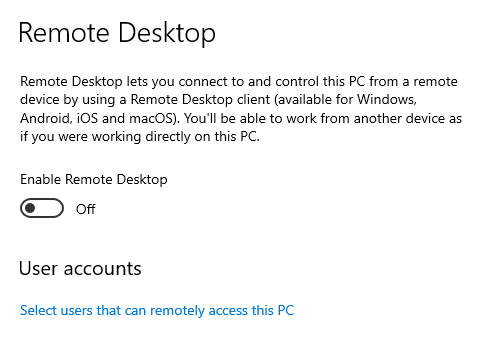
Disable Remote Desktop. If you’re dealing with a Windows computer, disable Remote Desktop. Remote Desktop is sometimes used by scammers in things like technical support scams, so if you don’t need it you may as well turn it off. You can do this in Settings. Here’s how to do it in Windows 10:
- Launch the Settings app. (shortcut Win + I)
- Under the System section, scroll down and click on the Remote Desktop option.
- Then, click on the toggle next to the Remote Desktop option to turn it off.
- Windows will prompt you to confirm your decision.
- Click on the Disable button and exit the settings app.
Use an easy to maintain blocklist or firewall. This can keep a lot of harm at bay. Alternatively, make use of security software that includes a web protection module. (We use Malwarebytes)
Configure the router/modem accordingly. Make sure to configure the home router and access points with unique usernames and passwords and do not use the default ones that come with the equipment. Many botnets will attempt to take over such devices by trying default credentials.
There are some other basic settings that can enhance the security of the home router without hindering the users:
- Turn off remote management if enabled.
- Use WPA2 or WPA3 (if available) encryption on Wireless routers.
Hang up, close the tab, and call your bank. A Dutch bank ran a very effective campaign that advised customers to “Hang up, close the tab, and call your bank.” This is very easy to remember and very effective at the same time. Tell your parents to remember that phrase when they see “urgent” warnings online or get cold calls from Microsoft, their bank, or any other entity that seeks access to personal or financial information. It’s good to teach your parents they shouldn’t trust that friendly voice with a concerned tone, if they can’t verify their identity. The same is true for text and chat messages. Even if the sender claims to be you on your new phone.
Repairs, upgrades, custom builds and refurbished.
Custom websites, local SEO, and secure hosting.
A printed document to full commercial signage.