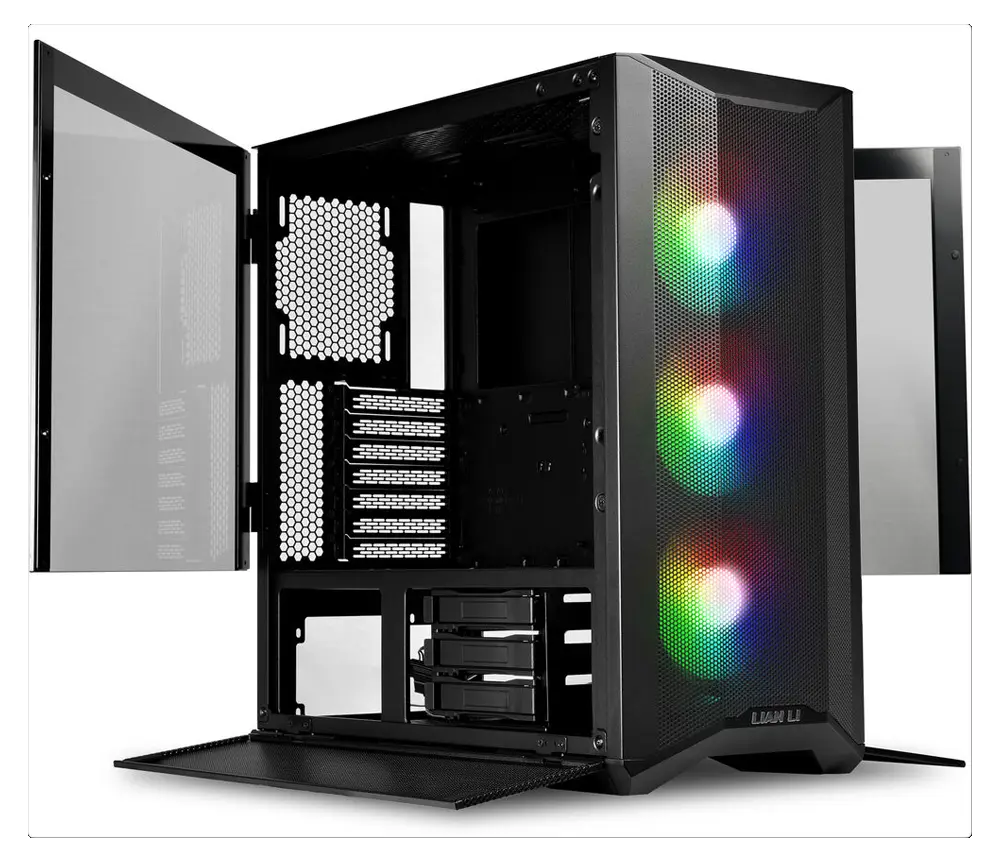
Top-tier performance that won’t leave your wallet on life support. 🚑 Grab that £500 refurbished saving and spend it on your Steam library instead! 🎮 Call, message, or swing by the shop to make it yours. 🛍️
Yet another one of those evil scam calls. This time, it was a fake BT Service Call. Thankfully my client didn’t hand over any quids or details, but the scammer locked the computer with a hidden password & encrypted all of his files, when he ended the call. Very malicious!
It took a while to extract & de-crypt all those gigabytes, but thankfully everything important was recovered…Phew! Full re-install of windows & scan of the recovered files, and we’re done.
Malicious is right! 😡 It’s a reminder that these scammers don’t just want your money; they want to cause chaos. I’m just glad we could recover the important stuff this time.
If you’re ever unsure about a ‘service call,’ just hang up. If you need a hand securing your tech or want a quick check-up, give me a shout or swing by the counter. 🏢🛡️
I don’t do many of these anymore, so it was nice to get back into recovering some memories for a Frolic Street neighbour. This recent project involved VHS to digital conversion, helping to preserve those memories for years to come.
Only three 3hr tapes, but 27 scenes to extract from some rather tired & re-used old tapes. Thankfully no mould present, but the tape was a bit stretched at some points, causing strange Slo-Mo effects!
After a LOT of winding & re-winding, eventually everything was extracted & ready for some digital trickery.
In to Adobe Premiere for a little clean-up of the video & some audio balancing, then it’s time to encode the files into something playable on multiple devices.
As the main recipient is a parent…. The first conversion was to a DVD format, along with some pretty menu’s, and recording to a high quality disc or three.
Then the files were converted to the x265 .MP4 format for compatibility on Apple/Windows/Android/YouTube etc, for sharing amongst the more digitally aware members of the family.
There’s nothing like seeing those old memories come back to life! 📼✨One of the joys of a job like VHS to digital conversion. Because these digital bits and pieces are so precious, it’s always good to have a backup.
You know where to find us for your tech help! 🏢🤝 Frolic House, between the Medical Practice and Driving Test Centre.
A Sturdy 19″ monitor with VGA, DVI & built-in speakers.
Built-in speakers, DVI, and that classic Viewsonic reliability. They don’t make them like this anymore! 🕹️ Great for a budget setup or a dedicated retro gaming nook.
Want it? Claim it before someone else does! 🏃💨 01686 610 106
Well it’s been one of my busiest weeks ever for “Brain Picking” calls & visits. Here’s a few highlights!
“My Hard Drive is making strange ticking noises, and my computer is going really slow”
Firstly, backup all your files & data ASAP, as it sounds like your hard drive is on it’s last legs & may be failing. Once you have your stuff safely backed up, you can download a very useful tool called CrystalDiskInfo. https://crystalmark.info/en/software/crystaldiskinfo/
It will give you a very quick diagnosis of the health of any hard drive/SSD or USB drive connected to your system.
“My Printer has stopped working since changing broadband suppliers”
As you have changed suppliers, you have probably got a new Router/Modem ?….. Yes! In that case you will have to re-install/connect the printer to your WiFi, like when you first got it. There should be a WiFi/Wireless configuration Icon or Button on the Printer. If you need a guide, the Printer manufacturers website should have one available. Look for “Quick Start Guide” or similar.
“My Laptop has frozen and I can’t shut it down”
Just pulling the plug, like you can do on a desktop pc, is out of the question as a laptop has an internal battery! And as most (maybe all nowadays) have the battery secreted away under the bottom cover, it can be a bit fiddly to take it out safely & quickly.
The easiest way to shut any type of computer down if it’s being grumpy, is to hold the power button down for 5-10 seconds, and it should shut down completely. If it just comes back to the frozen screen, you didn’t hold it down long enough, Try Again!
“Where’s Disk Clean-up Gone??”
Ah, Windows 11 hiding useful stuff again. Click on the “Start” button, in the little search box at the top start typing Disk Clean and it should appear in the menu, where you can pin it to your start menu for easy access.
“Why is my internet so slow ?”
There’s so many reasons for your internet speed slowing down. It could be your supplier having issues, Dodgy phone lines, Router/Modem problems, and that’s before the list of computer problems that can cause this.
First thing to check is your computer/device. Does it take forever to start & shutdown, open programs etc? If yes, your computer could be the reason, and probably needs a little TLC.
If the computer/device starts & runs well, test the internet speed by going to www.fast.com & see if you are getting what you pay for. Bear in mind though, that if you are using WiFi, a low signal between you and your router/modem will slow things down quite significantly. Connecting your device via Ethernet (Cat5/6) cable directly to your router/modem will get a more accurate speed test.
If the speed is below what you are supposed to get, contact your broadband supplier to get things checked out.
“Do I have to get rid of my Windows 10 Computer now it’s coming to an end, and won’t upgrade to Windows 11 ?”
I get this question on a daily basis. In most cases no. As long as you are using a decent anti-virus, you’ll have a few years left in the old beast yet! As time goes by, things like Google Chrome & MS Edge may refuse to update, but that’s at least 2-5 years away.
“Where have all the options gone when I right click on stuff ?”
At the bottom of the list is the “Show More Options” button, Sneaky Win 11…
There’s a few ways to disable the truncated context menus, but make sure it’s someone who knows what they are doing!
If you want to help the planet & save a few quid too, you can’t beat refurbished tech. Let’s recycle!
These days you can get your hands on top tier electronics for entry level prices, and seriously reduce your impact on the environment.
Or bring that slow old computer up to spec, with a modern SSD & a bit of recycled RAM to give it a new lease of life, for a lot less than you might think!
Limited stock of these little workhorses. Grab one quick! The Dell Latitude 5490 i7 Refurbished is an excellent choice for those needing power and reliability.
LOTS of power in a very compact & sturdy machine, built to last. Great for the traveller or student who requires a little extra horsepower.
14″ Full HD Screen (1920×1080)
Intel i7 8650u CPU
16Gb DDR4 RAM (up to 32Gb)
512Gb Intel NVMe SSD
Nvidia MX130 2gb Dedicated Graphics
Mobile Broadband
Illuminated Keyboard
Windows 11 Pro
All Bluesdigital refurbished computers are supplied with a no quibble 12 month Repair/Replace or Refund Warranty for total peace of mind
Need a laptop that actually keeps up with you? 🏃💨 The Dell Latitude 5490 i7 Refurbished packs more punch than your average ultra-book, and they’re sturdy enough for any student or traveller.
Limited stock available—bagsy yours now on 01686 610 106! ☎️✨